GENEVO MAX
USER MANUAL
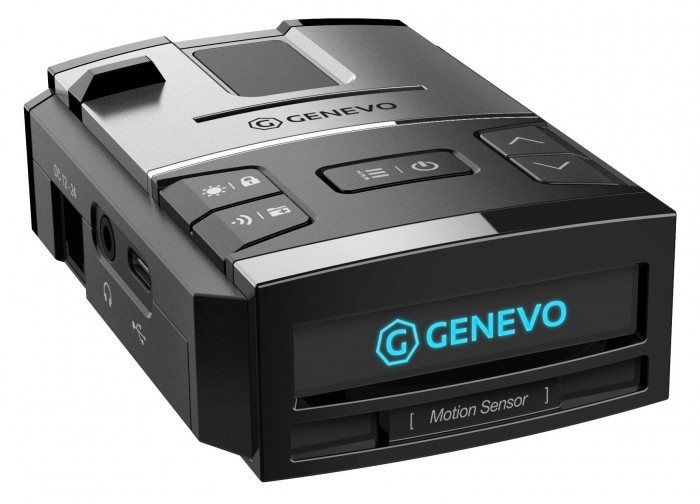
CONGRATULATIONS ON PURCHASING GENEVO MAX.
MAIN FEATURES OF YOUR GENEVO MAX DETECTOR:
GENEVO MAX is the first member of new lineup of Genevo radar detectors. It is designed primarily to protect the driver from unnecessary penalties for speeding due to reliable detection of:
- Microwave radars (K, Ka)
- MultaRadars CT and CD
- GATSO RT3 and RT4 radars
- Red-light cameras
- Stationary speed cameras
- Section speed cameras (using GPS updatable database)
ADVANCED FEATURES:
- Motion sensor for contactless operation. Silence the alert without having to search for the right button.
- Ambient light sensor for automatic brightness adjustment. The display automatically adjusts the brightness according to the amount of light in the cabin.
- Noise sensor in the cabin. The detector automatically adjusts the alert volume according to the level of noise inside the vehicle.
ALERT INTERPRETATION:
In the case of a radar alert, a visual warning appears on the display. A voice refers to the frequency band and the intensity of the intermittent tone (beep) expresses the strength of the received signal. The signal strength has nine levels for better distance expression. GPS points are reported verbally, such as “section speed cameras”.
QUICK GUIDE:
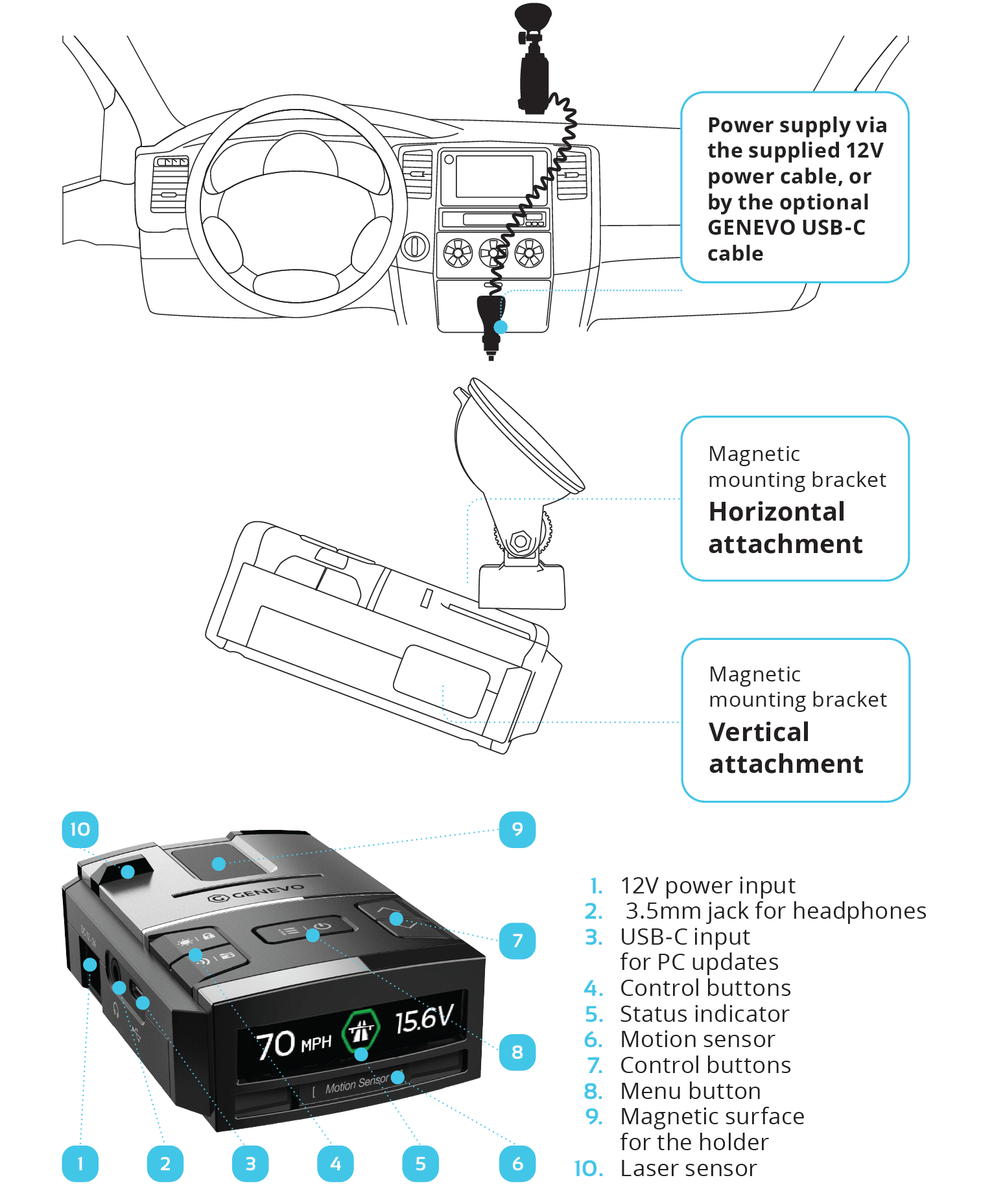
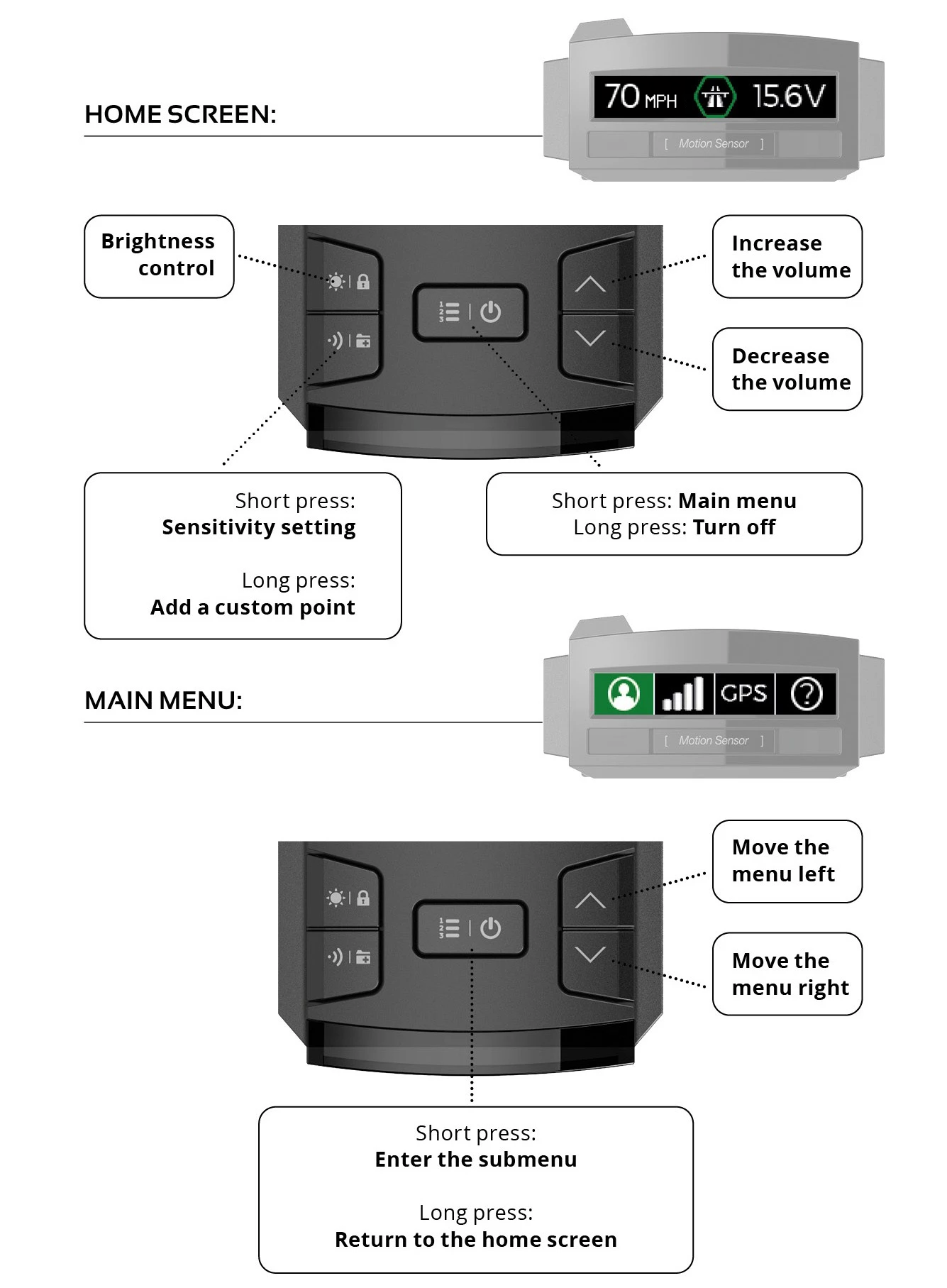
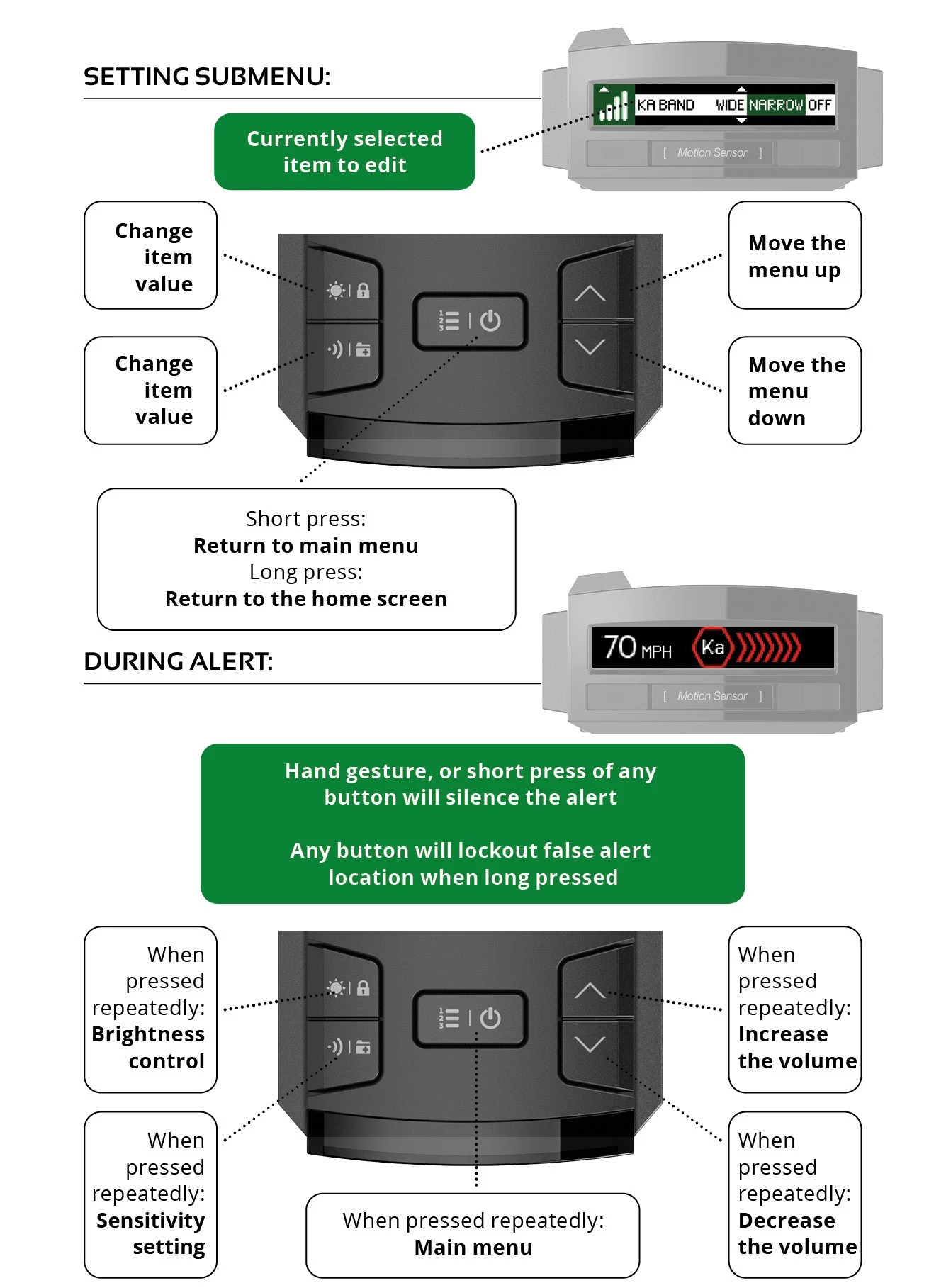
MAIN MENU ITEMS:
USER INTERFACE SETTINGS:

DISPLAY: Setting the information displayed on the right side of the display:
- TIME 24H - Displays time in 24h format.
- VOLTAGE - Displays the battery voltage.
- COMPASS - Displays driving direction.
- TIME AM/PM - Displays time in 12h format.
TIME: Setting local time zone.
USER BUTTON: (Functions are only available with an alternative, smart power cable with USB). The user button on the smart power cable can be set to the following functions:
- NONE - No function.
- POWER OFF - Turns the detector off.
- BRIGHTNESS - Changes the brightness setting.
- SENSITIVITY - Changes the sensitivity setting.
- MARK - Creates an user area.
- MUTE - Mutes an alert message.
- LOCKOUT - Suppresses a false alert location.
STARTUP SOUND: ON/OFF
GPS STATUS SOUND: ON/OFF. Notification of GPS connection/disconnection status
ALERTS: Set the alert type.
- VOICE FIRST - The detector announces the detected band first, then beeps according to the alert intensity.
- BEEP FIRST – The detector first starts beeping, then announces the detected band and then continues beeping.
- BEEP ONLY – The detector only beeps with the relevant band tone but does not report the detected band type.
AUTO MUTE: ON/OFF
- Automatically lowers the volume of alert messages after 5 seconds.
K TONE: 1-15 - Options for selecting different alert tone.
KA TONE: 1-15 - Options for selecting different alert tone.
MD TONE:1-15 - Options for selecting different alert tone.
MT TONE: 1-15 - Options for selecting different alert tone.
G3 TONE: 1-15 - Options for selecting different alert tone.
G4 TONE: 1-15 - Options for selecting different alert tone.
PR TONE: 1-15 - Options for selecting different alert tone.
PH TONE: 1-15 - Options for selecting different alert tone.
RF TONE: 1-15 -Options for selecting different alert tone.
DH TONE: 1-15 - Options for selecting different alert tone.
LASER TONE: 1-15 - Options for selecting different alert tone.
- These options allow you to choose different sound for each band separately.
AUTO VOLUME: ON/OFF - Automatically adapts the selected volume to the noise in the vehicle cabin.
MOTION SENSOR: OFF/QUICK/SLOW/NORMAL
UNITS: METRIC/IMPERIAL
LANGUAGE: ČESKY/SPANISH
UPDATE ALERT ON/OFF - Alerts you on startup when the detector database is out of date.
FACTORY RESET Returns to factory settings.
ALL USER AREAS DELETED: Deletes all saved user areas.
LOCKOUT RESET: Deletes all false alert locations (lockouts).
ALERTS NOTIFICATION SETTINGS:

Recommended settings for European countries can be found at: Support - Recommended settings
RADAR: ON/OFF
SENSITIVITY:
- HIGHWAY - Maximum detector sensitivity.
- CITY - Reduced sensitivity. We recommend using the reduced sensitivity only in the case of frequent alerts on a certain band (e.g. when driving abroad with frequent false alerts on the K band).
- AUTO CITY - Automatically changes the maximum and reduced sensitivity depending on the speed.
CITY:
- Sets the limit of reduced sensitivity. (E.g.: If you of ten encounter false alerts on the K band with signal strength 2 when driving through the city, then set K2, the detector will not warn of any signal lower than and equal to the set intensity, OFF will turn off this band in reduced sensitivity).
- K: 0–9/OFF
- Ka: 0–9/OFF
ACITY (AUTO CITY):
- This feature enables the sensitivity limit on the K, and Ka bands within the speed range set by ACITY Speed (see ACITY Speed below)
- K: 0–9/OFF
- Ka: 0–9/OFF
ACITY (AUTO CITY) SPEED:
- Automatically adjusts sensitivity to your speed. E.g. When set to 30 50, the detector will not notify you of any signal at speeds of less than 30 km/h, at speeds of 30-50 km/h, the detector will notify you according to the ACITY setting, and when driving at speeds over 50 km/h, the detector will automatically notify you with maximum sensitivity. When driving below the set speed, the detector will not warn of radars.
MIN SPEED:
- OFF/10-130KM/H - Sets the minimum speed at which the detector starts to alert on radars. E.g. when set to 20KM/H, the detector will only start to warn when this speed is exceeded.
K BAND: NARROW/WIDE/OFF
K FILTER: HIGH/LOW/OFF
KA BAND:
- NARROW – Narrowed Ka band for more specific band setup and fewer false alerts.
- WIDE – enables detection of the whole Ka band.
- OFF – disables Ka band detection
KA BAND 33.8: ON/OFF
KA BAND 34.3: ON/OFF
KA BAND 34.7: ON/OFF
KA BAND 35.5: ON/OFF
KA FILTER: HIGH/NORMAL/OFF
MRCD: ON/OFF
MRCT: NARROW/WIDE/OFF
MR FILTER: HIGH/LOW/OFF
- HIGH/LOW/OFF - This function filters out false alerts of cars that use a blind-spot assistant or adaptive cruise control. When the MR Filter function is active, detector sensitivity to MR CT/CD radars is slightly reduced.
GATSO RT3: ON/OFF
GATSO RT4: ON/OFF
PR: ON/OFF
- Pulse Radars - Vizir, Iskra.
PD: ON/OFF
- 3D Radars - Stalker Phodar.
REDFLEX NK: ON/OFF
HALO: ON/OFF
LASER: ON/OFF
GPS POINT ALERTS:

ALERT DISTANCE: 250m/350m/450m
- Setting the distance of stationary speed cameras, section speed cameras, dangerous spots and your own GPS points. Red-light cams are set at 250m.
OVERSPEED: -5 km/h TO +15 km/h (default 10 km/h).
- Setting of possible speeding without warning.
SPEEDCAM: ON/OFF
AVERAGE SPEEDCAM: ON/OFF
RED-LIGHT CAM: ON/OFF
DANGEROUS SPOT: ON/OFF
USER AREA: ON/OFF
LOCKOUT THE FALSE ALERT LOCATION:
- During an alert, by long pressing any button, suppress the false alert location.
ADD YOUR OWN GPS POINT:
- Long press any button to add your own GPS point.
ADDITIONAL MENU INFO

SPEEDMETER - LEGALIZATION FUNCTION:
This feature is used to legalize the device for use in countries where the radar detectors are prohibited. The detector stops alerting to radars and lasers. Only your current speed will appear on the display and all radar and laser detection settings will disappear from the menu. When entering the radar settings submenu, a notification of deactivated functions will appear.
To activate the Speedmeter, the detector must be turned ON, hold down the “Brightness control” and “Increase the volume” buttons simultaneously for 3 seconds. Option SPEEDMETER 1 will appear on the display, if you hold the buttons longer, you can select a second mode SPEEDMETER 2, with a classic display layout.
To deactivate the speedmeter function, it is necessary to update the detector in the usual way and all functions will be fully functional again, for help with updating continue to DATABASE UPDATE.
DATABASE UPDATES:
It is recommended to update the GPS database once a month. The detector can be updated in two ways:
- 1. Simply online for WIN and MacOS at: genevoupdate.com
- 2. By downloading the updater software for Windows OS at: genevo.com/en/updates
On these websites, you will find help on how to update and also a newsletter form, so we will keep you informed about every newly released update.
OPERATING FREQUENCY:
GPS: GPS, GLONASS, Galileo a QZSS
Ka narrow: 33,8 GHz, 34,3 GHz, 34,7 GHz, 35,5 GHz (±120 MHz)
Ka wide: 33,4 GHz – 36,0 GHz
K narrow: 24,125 GHz (±70 MHz)
K wide: 24,125 GHz (±150 MHz)
Laser: 904 nm
Pulse radars (PR): Vizir, Iskra, etc.
3D Radars:
MultaRadar: CD/CT
GATSO: RT3/RT4
Stalker Phodar (PD)
REDFLEX NK
REDFLEX HALO
TECHNICAL PARAMETERS:
Operation temperature: -20 °C to +85 °C
Storage temperature: -20 to +85 °C
Operation voltage: 11 – 24 V DC
Power consumption: 250 mA normal, 330 mA max (at 12 V)
Dimensions: 101 × 68 × 33 mm
Power Input: Pmax= 3.96 W
Connector polarity: Positive
Power supply fuse: F2A/250V
FCC COMPLIANCE
This device complies with Part 15 of the FCC rules. Operation is subjected to the following two conditions: (1) this device may not cause harmful interference, and (2) this device must accept any interference received, including interference that may cause undesired operation.
Changes or modifications not expressly approved by the party responsible for compliance could void the user's authority to operate the equipment.
Before using the device, check the legislation in the country of use. If you wish to dispose of electrical and electronic equipment, please contact your dealer or supplier for further information.
Use the device only in accordance with the user manual. Do not use the device if it is damaged!
FCC INTERFERENCE STATEMENT
This equipment has been tested and found to comply with the limits for a Class B digital device, pursuant to part 15 of the FCC Rules. These limits are designed to provide reasonable protection against harmful interference in a residential installation.
This equipment generates, uses and can radiate radio frequency energy and, if not installed and used in accordance with the instructions, may cause harmful interference to radio communications. However, there is no guarantee that interference will not occur in a particular installation.
If this equipment does cause harmful interference to radio or television reception, which can be determined by turning the equipment off and on, the user is encouraged to correct the interference by one of the following measures:
- Reorient or relocate the receiving antenna.
- Increase the separation between the equipment and receiver.
- Connect the equipment into an outlet on a circuit different from which the receiver is connected.
- Consult the dealer or an experienced radio/TV technician for help.
IC COMPLIANCE
This device complies with Industry Canada license-exempt RSS standard(s). Operation is subject to the following two conditions: (1) this device may not cause interference, and (2) this device must accept any interference, including interference that may cause undesired operation of the device.
Changes or modifications not expressly approved by the party responsible for compliance could void your authority to operate the equipment.
Cet appareil est conforme aux normes RSS exemptes de licences d’Industrie Canada. Son fonctionnement est soumis aux deux conditions suivantes : (1) cet appareil ne doit pas causer d’interférences nuisibles et (2), il doit pouvoir accepter les interférences, incluant celles pouvant nuire à son fonctionnement normal.
Tout changement ou modification non approuvé expressément par la partie responsable pourrait annuler le droit à l’utilisateur de faire fonctionner cet équipement.
Safety Information & Installation
Driving Safety:Always prioritize safe driving and obey all local traffic laws. Do not attempt to adjust settings or interact with the device while the vehicle is in motion. Concentration should be focused on driving and road conditions.
Proper Mounting:Mount the device securely using the provided hardware. Do not install the device in a manner that obstructs the driver's field of vision or interferes with the operation of vehicle controls (e.g., steering wheel, pedals, or gear shift).
Airbag Deployment:Do not place or mount the device over or near airbag deployment areas. An activating airbag can strike the device and cause it to become a projectile, leading to serious injury or death.
Intended Use:This product is intended for use as a driving aid. It is not a substitute for responsible driving. The manufacturer is not responsible for any traffic violations or accidents resulting from the use or misuse of this device.
⚠️ WARNING: Cancer and Reproductive Harm - www.P65Warnings.ca.gov
This product may contain chemicals, such as lead, known to the State of California to cause cancer and birth defects or other reproductive harm.
CE - DECLARATION OF CONFORMITY:
The manufacturer, GENEVO s.r.o., hereby declares that GENEVO MAXequipment complies with the essential requirements and other relevant provisions of Directive 2014/53/EU. The full Declaration of Conformity can be downloaded here: www.genevo.com/en/ce-max.pdf
EXPLANATORY NOTES:
Radar frequency bands: Different radar bands are used to measure speed, most often Ka, K, or newer MultaRadars and GATSO Radars that have extremely low transmit power and are hard to detect. Different bands and frequencies are used in each country, it is therefore necessary to have the detector set up correctly for each country. Recommended settings for European countries can be found at: Support - Recommended settings
- Ka - One of the most commonly used radar band for speed measuring.
- K - The most widely used band at all, is comonnly used for automatic doors at petrol stations and shops, adaptive cruise control, etc. Devices operating in the K band cause false alerts, so their quality filtration is essential.
- X – Minimally used band, mainly insome Eastern European countries.
- CD/CT MultaRadars - Modernradars used in Austria, Iceland, Netherlands, Poland, Portugal, Slovakia, Spain.
- DAHUA - Modulated 3D K band based radar with extremely low power output.
- GATSO radars - Another modern radars, they can be stationary or mobile. They are used in Belgium, France, Finland, Great Britain, Lithuania, Netherlands, Slovenia. They are divided into RT2/RT3/RT4 - a higher number means a more modern version. The detection of these radars is possible only by the latest and most sensitive detector.
Wide: Broadband mode, on the other hand, searches for example the entire Ka band from 33.4 GHz to 36.0 GHz. Use this setting only if absolutely necessary, as it shortens the detection distance and increases the number of false alerts.
Filters and false alerts: For the correct functioning of the detector, it is essential to filter unwanted radar signals from sources other than police radars (eg adaptive cruise control of modern vehicles), so that the detector reports only police radars. The filter settings are further described on page 7 in the manual (ALERTS NOTIFICATION SETTINGS).
Laser measurement: Laser speed measurement is based on emitting an ultra narrow and short-time beam of electromagnetic light at the level of infrared radiation. The signal is transmitted for a very short time at a specific place (usually car’s licence plate) and therefore, it is almost imposible to detect it in advance. The only effective protection against laser speed measurement is an additional active laser system.
GPS: The GPS antenna detects measurements that do not transmit any signal. These include section measurements, stationary radars (induction loops) or "red light cameras". We continuously add everything to the GPS database of stationary threats, all you have to do is keep the detector updated.
Version: 2026-01-03
Manufacturer: GENEVO s.r.o., Radčina 497/22, Liboc, 161 00, Praha 6
Brand Representative: GENEVO AMERICA, 12557 New Brittany Blvd 3 v1005, Fort Myers, FL 33907
MADE IN KOREA